This is the research paper I wrote back in 2022 about a weirdly specific problem: self-driving cars film everyone on the street, so how do you keep that footage useful for training without keeping people's faces in it? My answer was to swap every face for one that belongs to nobody. The paper is up on OSF as a preprint, and the demo code is on GitHub.
Why I wrote it
I got the chance to work on this through a collaboration opportunity with Bosch Global Software, with a mentor guiding me through it. The problem goes like this. A test car carries front, side and rear cameras, plus LiDAR, radar and thermal sensors, and it drives around public roads for ages, so it ends up recording the faces of random people walking by. Those recordings are what the driving models learn from, and nobody wants a model that has quietly picked up a bunch of strangers' faces. Privacy rules get in the way too. The neat trick is that anonymized data generally falls outside those rules, so if you can anonymize the faces, you can keep training on the footage.
Blurring is the obvious way to anonymize, but the main thing I wanted to try was swapping: put a face in the frame that just isn't the real one.
What it found
I tried three approaches on recorded video, and each one taught me something about the next.
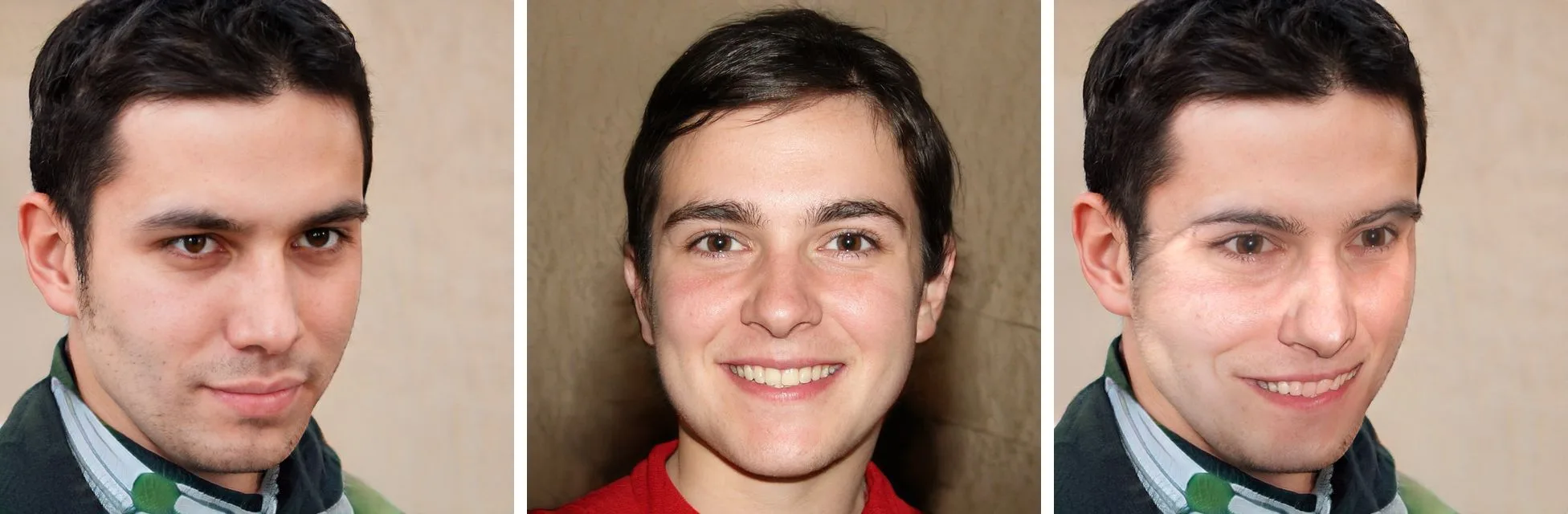
- OpenCV face swap. OpenCV splits the video into frames, the code finds the face, splits it into triangles with Delaunay triangulation, swaps in a preset AI-generated face and smooths the edges. It worked up close, but it fell apart for people far from the camera, which is kind of the whole situation on a street.
- MediaPipe Holistic blur. MediaPipe Holistic finds the face landmarks and the code draws dots over them until the face is gone. Honestly it had no real limitations, but it doesn't swap anything, so it skipped the actual point of the paper.
- MediaPipe Face Mesh swap. Face Mesh maps the face as a cloud of points, the code swaps the face along those points and smooths it. Better, but it still struggled at a distance. It only worked when the face covered somewhere between 2% and 50% of the frame.
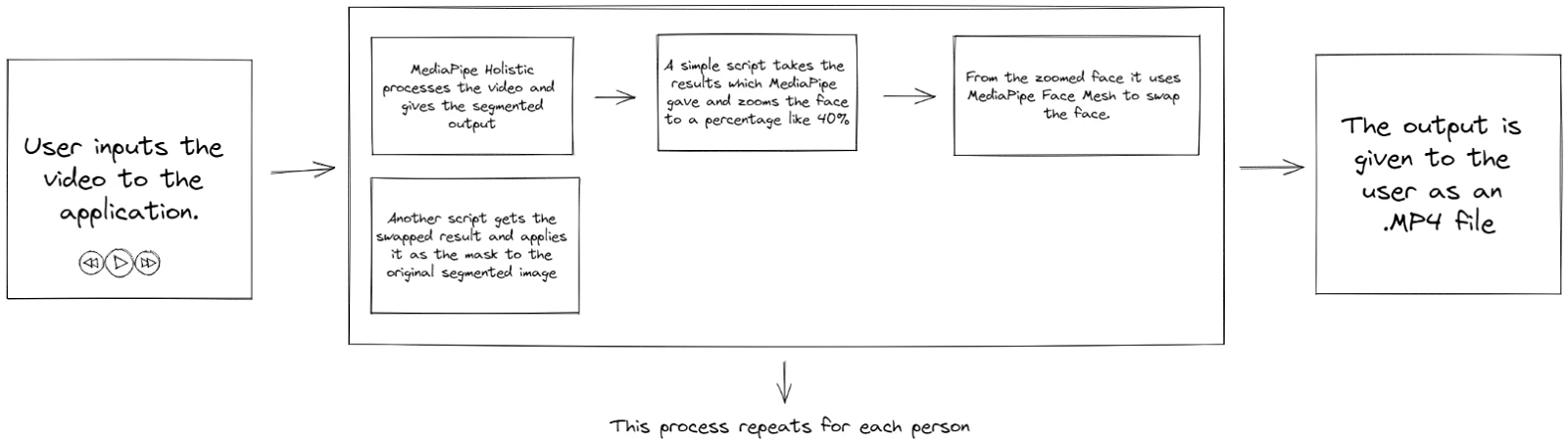
That 2% to 50% window was the clue. A person 15 feet away has a tiny face, way under 2% of the frame. So the combined approach stitches the pieces together:
- Holistic, which I'd used for blurring, gets repurposed to segment each person out of the frame.
- The face gets zoomed until it's around 40% of the image, right in the middle of the range Face Mesh likes.
- Face Mesh swaps the face.
- The result goes back onto the original segmented image as a mask.
It repeats that for every person in the frame and writes out an MP4. In the paper I found this works well for faces up to 15 feet away, where the plain OpenCV swap had already given up.
To be upfront about the limits: it's a solo-author preprint, not peer reviewed, and 15 feet is the only number in it. I didn't measure accuracy or how well a driving model trains on the swapped footage. The conclusion is pretty modest: every single approach had a weak spot, and combining them fixed some of those weak spots.
How the code works
The demo code is the Face Mesh swap. Face Mesh finds landmarks on both the camera face and the replacement face, and the code joins them into the same set of triangles. OpenCV warps each replacement triangle onto the matching triangle of the real face with warpAffine, then seamlessClone blends the new face into the frame so the edges don't look pasted on. The replacement face gets downloaded from This Person Does Not Exist when the script starts, so it's a face that belongs to no one, and pressing c cycles through the faces you have.
AutonomousDrivingPaperCode runs the swap live on your webcam. AutonomousDrivingPaperCodeCombined runs the same swap on a video file instead, which in my case was a clip called Anirudh Moving.mp4 (yes, it was me, walking around). Neither repo has the segmentation and zoom steps, though, so the full combined pipeline only lives in the paper.